Admins vs. Members
BandMath uses a simple but strict role-based permission system to ensure your financial data remains secure and organized. There are two primary roles in any band workspace: Admins and Members.
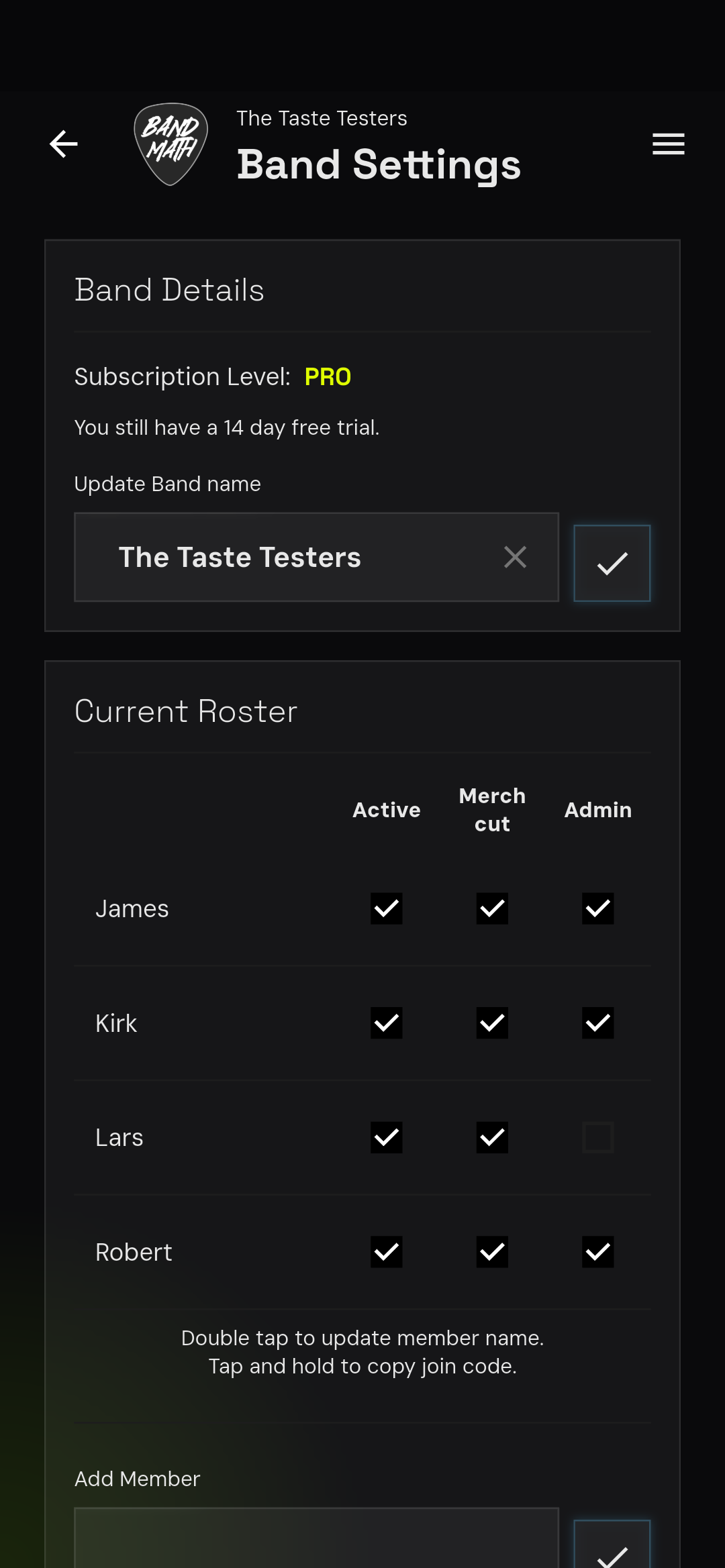
Admins
The user who creates the band profile is automatically assigned as the first Admin.
Admins have full control over the band's workspace. Their capabilities include:
- Managing Members: Adding new members, generating invite codes, and removing members.
- Managing Settings: Changing the band's name, base currency, and other core settings.
- Managing Billing: Upgrading or downgrading the band's subscription tier.
- Merch Management: Full access to add, edit, and delete merchandise inventory and product definitions.
Members
Members are the standard users within a band workspace. They have the ability to participate in the financial ecosystem but with restricted administrative access.
Members can:
- Log Transactions: Add new expenses, incomes, or transfers to the ledger.
- Edit Transactions: Edit or delete any transaction in the ledger, regardless of who created it.
- View the Ledger: See all transactions and the current standings/settlements.
- Sell Merchandise: Use the Point-of-Sale (POS) system to log merch sales.
Members cannot:
- Access the Band Settings page.
- Remove other members from the band.
- Change the band's core settings or billing tier.
tip
A band can have multiple Admins. An existing Admin can promote any Member to an Admin role from the Band Settings page.